It's been a while since my last post, not that I don't have the time cause I'm busy at work or run out of problems to blog. The real reason is that i forgot my damn password :) and did not care to retrieve it till now.
Why now? Why bother at all? :@
Well, because I'm in a new adventure! A very challenging endeavor that i think is worth blogging.
I'm going back to the academe! Yes after long years of working finally decided to formalize these skills that I acquired.
What adds up to the excitement is that I'm doing this in the Middle Earth!
hooray yippe yay yey visa approved!
Thanks to all our friends and relatives who supported and still helping us make our dream become a reality. Our prayers we're answered.
Thanks to almighty God for all the blessings.
I know we're still far away, but I'm glad we're already at the start of our journey.
Tuesday, July 19, 2016

Wednesday, July 23, 2014
Monday, September 30, 2013
Hortonworks Sandbox for Hyper-V on Windows 8
This instructions will guide you to properly run Hortonworks Sandbox Hyper-V on windows 8.
1. First download the sandbox here make sure click the Sandbox for Hyper-V.
2. Follow the instructions here (pre-requisites also included here on how to enable Hyper-V on Windows 8)
3. When the VM host and running you will see window just like the image below:

but when using "http://192.168.56.101/ nothing happens. (display using chrome browser)

Solution: Open up your sandbox connection and change the IP using the subnet range as the Hortonworks default IP address.

Upon applying the changes you should now be able to browse the Hortonworks SandBox registration page.

I hope this instructions save you time.
Cannot Generate SSPI context
Cannot generate SSPI context. at System.Data.SqlClient.SqlInternalConnection.OnError(SqlException exception, Boolean breakConnection)
I'm always face to this problem more often so I've decided to write it down.
This scenario occurs whenever my staging servers restarted and when I'm publishing my solution.
My solution to this is just to log a user with admin privileges to the server so that it will established connection to my domain.
This fix works for me everytime.
My solution to this is just to log a user with admin privileges to the server so that it will established connection to my domain.
This fix works for me everytime.
Wednesday, October 10, 2012
ASP Page not applying css and images
If web.config file entry below does not work:
<location path="images">
<system.web>
<authorization>
<allow users="*" />
</authorization>
</system.web>
</location>
<location path="css">
<system.web>
<authorization>
<allow users="*" />
</authorization>
</system.web>
</location>
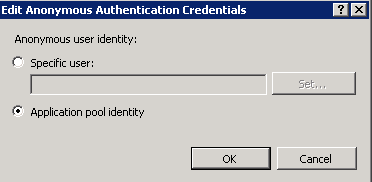
Open up IIS manager and click authentication and set anonymous to application pool if your using Integrated Authentication.
<location path="images">
<system.web>
<authorization>
<allow users="*" />
</authorization>
</system.web>
</location>
<location path="css">
<system.web>
<authorization>
<allow users="*" />
</authorization>
</system.web>
</location>
Open up IIS manager and click authentication and set anonymous to application pool if your using Integrated Authentication.
Wednesday, September 26, 2012
Form Based Authentication DB Registration
To register a Database for Form-based Authentication in ASP.NET you can use the command line tool
aspnet_regsql.
aspnet_regsql.exe
To use the To use the tool, just run'aspnet_regsql.exe'
It should be located here:
C:\%windir%\Microsoft.NET\Framework\
mine work like this:
"C:\Windows\Microsoft.NET\Framework\v2.0.50727\aspnet_regsql.exe"
Thursday, June 21, 2012
Removing multiple spaces using recursive solution
This function will replace multiple spaces into single space.
Recursive Solution:
CREATE FUNCTION [dbo].[ufn_TrimSpaces]
(
@strDetails varchar(100)
)
RETURNS varchar(100)
AS
BEGIN
WHILE CHARINDEX(' ',@strDetails) > 0
BEGIN
SET @strDetails = REPLACE(@strDetails, ' ',' ')
END
RETURN LTRIM(RTRIM(@strDetails))
END
to test:
declare @test varchar(100)
set @test = ' This is sample text '
select dbo.ufn_TrimSpaces(@test)
Recursive Solution:
CREATE FUNCTION [dbo].[ufn_TrimSpaces]
(
@strDetails varchar(100)
)
RETURNS varchar(100)
AS
BEGIN
WHILE CHARINDEX(' ',@strDetails) > 0
BEGIN
SET @strDetails = REPLACE(@strDetails, ' ',' ')
END
RETURN LTRIM(RTRIM(@strDetails))
END
to test:
declare @test varchar(100)
set @test = ' This is sample text '
select dbo.ufn_TrimSpaces(@test)
Wednesday, June 20, 2012
Fix Restored DB backup user login account
Run the script below to fix the user account login from restored db backup.
Use
sp_change_users_login 'auto_fix' ,''
Use
sp_change_users_login 'auto_fix' ,'
Tuesday, June 19, 2012
Restoring from backup: System.Data.SqlClient.SqlError: File cannot be restored over the existing
Restore from backup encountered error: System.Data.SqlClient.SqlError: File "" cannot be restored over the existing:
Reissue the RESTORE statement using WITH REPLACE to overwrite pre-existing files, or WITH MOVE to identify an alternate location.
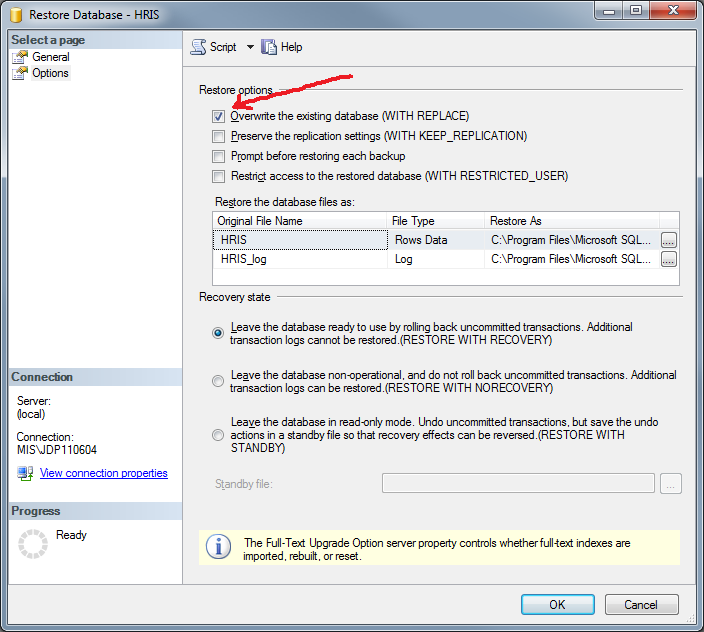
Solution: Click the option page and check the Overwrite the existing database (With Replace). see image below.

Reissue the RESTORE statement using WITH REPLACE to overwrite pre-existing files, or WITH MOVE to identify an alternate location.
Solution: Click the option page and check the Overwrite the existing database (With Replace). see image below.
Monday, June 18, 2012
Shrink SharePoint Config Log files
1. Backup your sharepoint config log files.
2. Execute the query belowusing Microsoft SQL Server Management Studio.
Note: change to your specific sharepoint config file names.
USE SharePoint_Config
GO
-- Truncate the log by changing the database recovery model to SIMPLE.
ALTER DATABASE SharePoint_Config
SET RECOVERY SIMPLE;
GO
-- Shrink the truncated log file to 50 MB.
DBCC SHRINKFILE (SharePoint_Config_log, 50); -- here 2 is the file ID for trasaction log file,you can also mention the log file name (dbname_log)
GO
-- Reset the database recovery model.
ALTER DATABASE SharePoint_Config
SET RECOVERY FULL;
GO
2. Execute the query belowusing Microsoft SQL Server Management Studio.
Note: change to your specific sharepoint config file names.
USE SharePoint_Config
GO
-- Truncate the log by changing the database recovery model to SIMPLE.
ALTER DATABASE SharePoint_Config
SET RECOVERY SIMPLE;
GO
-- Shrink the truncated log file to 50 MB.
DBCC SHRINKFILE (SharePoint_Config_log, 50); -- here 2 is the file ID for trasaction log file,you can also mention the log file name (dbname_log)
GO
-- Reset the database recovery model.
ALTER DATABASE SharePoint_Config
SET RECOVERY FULL;
GO
Wednesday, January 11, 2012
SharePoint 2010 limit exceeded in BCS
Connector has throttled the response. The response from database contains more than '2000′ rows. The maximum number of rows that can be read through Database Connector is '2000Connector has throttled the response. The response from database contains more than '2000′ rows. The maximum number of rows that can be read through Database Connector is '2000
Check limit
$bcs = Get-SPService
PS C:\Users\administrator> $bcs = Get-SPServiceApplicationProxy | where{$_.G
etType().FullName -eq (`Microsoft.SharePoint.BusinessData.SharedService.' + `BdcServiceApplicationProxy')}
PS C:\Users\administrator>
PS C:\Users\administrator> $BCSThrottle = Get-SPBusinessDataCatalogThrottleConfig -Scope database -ThrottleType items -ServiceApplicationProxy $bcs
PS C:\Users\administrator> $BCSThrottle
Scope : Database
ThrottleType : Items
Enforced : True
Default : 2000
Max : 1000000
Set Limit to 50000
PS C:\Users\administrator> Set-SPBusinessDataCatalogThrottleConfig -Identit
y $BCSThrottle -Maximum 1000000 -Default 50000
PS C:\Users\administrator> $BCSThrottle = Get-SPBusinessDataCatalogThrottle
Config -Scope database -ThrottleType items -ServiceApplicationProxy $bcs
PS C:\Users\administrator>
PS C:\Users\administrator> $BCSThrottle
Scope : Database
ThrottleType : Items
Enforced : True
Default : 50000
Max : 1000000
Check limit
$bcs = Get-SPService
PS C:\Users\administrator> $bcs = Get-SPServiceApplicationProxy | where{$_.G
etType().FullName -eq (`Microsoft.SharePoint.BusinessData.SharedService.' + `BdcServiceApplicationProxy')}
PS C:\Users\administrator>
PS C:\Users\administrator> $BCSThrottle = Get-SPBusinessDataCatalogThrottleConfig -Scope database -ThrottleType items -ServiceApplicationProxy $bcs
PS C:\Users\administrator> $BCSThrottle
Scope : Database
ThrottleType : Items
Enforced : True
Default : 2000
Max : 1000000
Set Limit to 50000
PS C:\Users\administrator> Set-SPBusinessDataCatalogThrottleConfig -Identit
y $BCSThrottle -Maximum 1000000 -Default 50000
PS C:\Users\administrator> $BCSThrottle = Get-SPBusinessDataCatalogThrottle
Config -Scope database -ThrottleType items -ServiceApplicationProxy $bcs
PS C:\Users\administrator>
PS C:\Users\administrator> $BCSThrottle
Scope : Database
ThrottleType : Items
Enforced : True
Default : 50000
Max : 1000000
Tuesday, January 10, 2012
Restore Lost User when restoring from full DB backup in SQL Server 2008
MS SQL Server 2008 R2
To fix user login from the restored full db run the query below
EXEC sp_change_users_login 'Auto_Fix','user1',NULL,'mypassword'
To fix user login from the restored full db run the query below
EXEC sp_change_users_login 'Auto_Fix','user1',NULL,'mypassword'
Sunday, December 18, 2011
Could not save the list changes to the server. This list cannot be deleted.
When SharePoint 2010 list becomes unavailable to delete.
error message: Could not save the list changes to the server. This list cannot be deleted.
solution: run powershell command as administrator type-in the ff:
$web = Get-SPWeb http://yourserver
$list = $web.Lists["MyList"]
$list.AllowDeletion = $True
$list.Update()
Now go to your list settings again and you'll see the delete command or you can just run the line below:
$list.Delete()
hope that helps!
error message: Could not save the list changes to the server. This list cannot be deleted.
solution: run powershell command as administrator type-in the ff:
$web = Get-SPWeb http://yourserver
$list = $web.Lists["MyList"]
$list.AllowDeletion = $True
$list.Update()
Now go to your list settings again and you'll see the delete command or you can just run the line below:
$list.Delete()
hope that helps!
Thursday, November 10, 2011
saving it is not permitted because the changes you have made require the listed tables to be dropped and re-created.

Problem: Saving always warns you that it is not permitted because the changes you have made require the listed tables to be dropped and re-created.
Solution: In SQL Management menu go to Tools menu, click Options, expand Designers, and then click Table and Database Designers. Select or clear the Prevent saving changes that require the table to be re-created check box.
Cheers!
Wednesday, September 28, 2011
How to enable developer dashboard
This is will display helpful information regarding the call stack, database query times, exception information in error messages, and loading events for web parts during page rendering and will appear at the bottom page view.
stsadm -o setproperty -pn developer-dashboard -pv OnDemand (Recommended Setting)
stsadm -o setproperty -pn developer-dashboard -pv on
stsadm -o setproperty -pn developer-dashboard -pv off
It can be enabled via STSADM or PowerShell.
The property value set OnDemand will provides you the ability to toggle the dashboard on and off.
stsadm -o setproperty -pn developer-dashboard -pv OnDemand (Recommended Setting)
stsadm -o setproperty -pn developer-dashboard -pv on
stsadm -o setproperty -pn developer-dashboard -pv off
It can be enabled via STSADM or PowerShell.
The property value set OnDemand will provides you the ability to toggle the dashboard on and off.
Wednesday, May 11, 2011
How to add role DC using Windows Server 2008 R2
been lazy to write an article about creating a DC role in win2008R2 so here is a helpful link with step by step snapshot of actual installations:
Running Windows Server 2008 R2 Installing DC
Running Windows Server 2008 R2 Installing DC
Wednesday, April 27, 2011
Dreaded 503 After SP2010 Installation
after a 'successful installation of SP2010' application pool for 'Central Administration v4.0 is stopping due to WAS error: 5059, this happen when a domain group policy is implemented. There are tons of solutions you can easily found by googling this error and probably would suggest editing of applicationhost.config or even adding of service account in 'login as batch', however these might or might not solve your issue.
Specially when you don't have the privileged to edit the GPO or even the local policy is locked because the 'Domain Group Policy' supersede the local policy.
Note: I used my standard domain account that has full privileged to both SQL Server and Local Server.
Changing Application Pool Identity to Network Service will run OK but will encounter Database connection failure, even if you give the identity dbcreator or sysadmin server role.
To make the story short:
Solution that works for me is to use local account in the SP configuration(I wouldn't advice this unless for testing purposes only). Yeah I was aware that local account is for stand alone only and SP GUI wouldn't allow local account to be used as Database Access, but there is a clever workaround here.
POWERSHELL is you friend!
After installing SharePoint 2010 do not run the Config wizard yet. make sure that there are no created SharePoint Admin and Config database, if so just delete it and application pools as well.
Note:
Run the "SharePoint 2010 Management Shell" by using Administrator rights. Click the Icon and select 'run as administrator', otherwise you'll encounter registry write error. Don't make me say I told you so! :P
Type and execute the command below:
PS> C:\Users\ New-SPConfigurationDatabase
cmdlet New-SPConfigurationDatabase at command pipeline position 1
Supply value for the following parameters:
DatabaseName: SharePoint_Config
DatabaseServer:
FarmCredentials
Passphrase:
-
after a successful creations of SharePoint Admin and Config databases. Run the SharePoint Confguration GUI wizard again and connect the created databases.
Update: 4/29/2011
THIS WILL WORK ONLY IF YOU'LL USE LOCAL ACCOUNTS (Farm and Complete installations)
For real solutions is to add ISS_IUSRS in 'logon as batch' when
global policy is implemented.
For reference:
Specially when you don't have the privileged to edit the GPO or even the local policy is locked because the 'Domain Group Policy' supersede the local policy.
Note: I used my standard domain account that has full privileged to both SQL Server and Local Server.
Changing Application Pool Identity to Network Service will run OK but will encounter Database connection failure, even if you give the identity dbcreator or sysadmin server role.
To make the story short:
Solution that works for me is to use local account in the SP configuration(I wouldn't advice this unless for testing purposes only). Yeah I was aware that local account is for stand alone only and SP GUI wouldn't allow local account to be used as Database Access, but there is a clever workaround here.
POWERSHELL is you friend!
After installing SharePoint 2010 do not run the Config wizard yet. make sure that there are no created SharePoint Admin and Config database, if so just delete it and application pools as well.
Note:
Run the "SharePoint 2010 Management Shell" by using Administrator rights. Click the Icon and select 'run as administrator', otherwise you'll encounter registry write error. Don't make me say I told you so! :P
Type and execute the command below:
PS> C:\Users\
cmdlet New-SPConfigurationDatabase at command pipeline position 1
Supply value for the following parameters:
DatabaseName: SharePoint_Config
DatabaseServer:
FarmCredentials
Passphrase:
-
after a successful creations of SharePoint Admin and Config databases. Run the SharePoint Confguration GUI wizard again and connect the created databases.
Update: 4/29/2011
THIS WILL WORK ONLY IF YOU'LL USE LOCAL ACCOUNTS (Farm and Complete installations)
For real solutions is to add ISS_IUSRS in 'logon as batch' when
global policy is implemented.
For reference:
Tuesday, April 26, 2011
Sharepoint 2010 'Missing Dependencies' error
Sharepoint 2010 Problems and Solutions
Error: After a fresh installation of Sharepoint 2010 you will notice this error under configuration stating 'Missing Dependencies' etc.
Solution: To remove this error just simply browse these pages.
SearchAdministration.aspx
SearchFarmDashboard.aspx
In Central Administration
go to General Application Settings -> Farm Search Administration -> Search Service Application.
On the upper left corner or side menu, under 'Administration Section' just click and b browse 'Search Administration' and 'Farm Search Administration'
go back and click the issue report again and run the 'Reanalyze Now"
and waaalah! (the error should disappear in the health analyzer report).
another solution is by just enabling the search services.
Error: After a fresh installation of Sharepoint 2010 you will notice this error under configuration stating 'Missing Dependencies' etc.
Solution: To remove this error just simply browse these pages.
SearchAdministration.aspx
SearchFarmDashboard.aspx
In Central Administration
go to General Application Settings -> Farm Search Administration -> Search Service Application.
On the upper left corner or side menu, under 'Administration Section' just click and b browse 'Search Administration' and 'Farm Search Administration'
go back and click the issue report again and run the 'Reanalyze Now"
and waaalah! (the error should disappear in the health analyzer report).
another solution is by just enabling the search services.
Wednesday, April 6, 2011
Sharepoint 2010 Igniter
got the privilege to attend Sharepoint 2010 Ignite Training for Developers in CED-IT cebu, Philippines. Hopefully I could blog partially the impressions later on. excited? horaa..take a breath.
Subscribe to:
Posts (Atom)